At some point last week, a Claude instance running inside someone else's application called garagedoorscience.com, got back a partner name and phone number, and passed it to the human sitting at the keyboard. I don't know who the human was. I don't know whose application it was. What I know is that it worked, and that the site was ready for it — not because I planned for that specific caller, but because I built the thing to be callable in the first place.
That's the distinction I want to walk through here, because it took me longer than it should have to understand it.
The gap in your form
Most websites are built for one thing: a human with a browser. Click, scroll, fill out the form, submit. That's fine. That is still most of web traffic.
But here is what's changed: a growing percentage of people looking for answers are starting that search inside a chat interface. They ask Claude or ChatGPT what's wrong with their garage door. They ask Perplexity whether they need a repair or a replacement. They're not typing "garage door won't close" into Google and clicking the third result anymore. They're telling an AI what's happening and letting it figure out where to send them.
Your form-based site cannot be called by these systems. Your FAQ page cannot be called. The PDF that explains your service areas cannot be called. These formats are readable by a human who navigates to them. They are not callable by a program that's already in the middle of helping someone.
The gap isn't SEO. It's that your site has no machine-callable surface at all.
The pattern I landed on
Here is the simplest version of what changed when I built garagedoorscience.com: I defined my tools once, as plain TypeScript, and then exposed them through every surface that any kind of agent might try to reach. Six of those surfaces are machine-readable. One is human-readable but written for the machine to understand.
The tools — the actual business logic — live in a single file: lib/mcp/tools.ts. Each entry has a name, a description, an input schema, and a handler. That's it. Right now there are eight of them: diagnose, routeByZip, getDoorStyles, getActivePromotions, getInspectionReferencePhotos, retrieveLabContext, costEstimate, and submitInspection. If I add a ninth tomorrow, I add one entry to that file, and it appears everywhere automatically.
That "everywhere" is the part worth explaining.
The seven surfaces
/mcp — the public MCP endpoint. MCP is a standard for tool-calling that lets AI applications discover and call external tools directly. Claude Desktop supports it. ChatGPT supports it. My /mcp endpoint accepts unauthenticated requests, exposes all eight tools, and returns results over JSON-RPC. I rate-limit it per IP — 60 requests per minute, 2,000 per day — but it's open. Any agent can walk up and use it.
/mcp-pro — the same handler, higher limits. Authenticated with a bearer token that developers self-serve from /developers. Pro callers get deeper retrieval — up to ten RAG results per query instead of three — and a higher rate ceiling. Same business logic underneath. Different tier.
These two share a handler in lib/mcp/server.ts. The route files are thin wrappers that pass a tier constant. I'm not maintaining two implementations. I'm maintaining one.
/api/v1/<tool> — the REST shim. Not every agent framework speaks MCP. Some speak plain HTTP. So there's a dynamic REST route that resolves any tool by path segment: POST to /api/v1/diagnose with a JSON body and get back the same thing the MCP endpoint would return. No auth gives you the public tier, a valid gds_live_ bearer gives you the pro tier. The rate-limit bucket is shared across both protocols so you can't bypass the cap by switching transports.
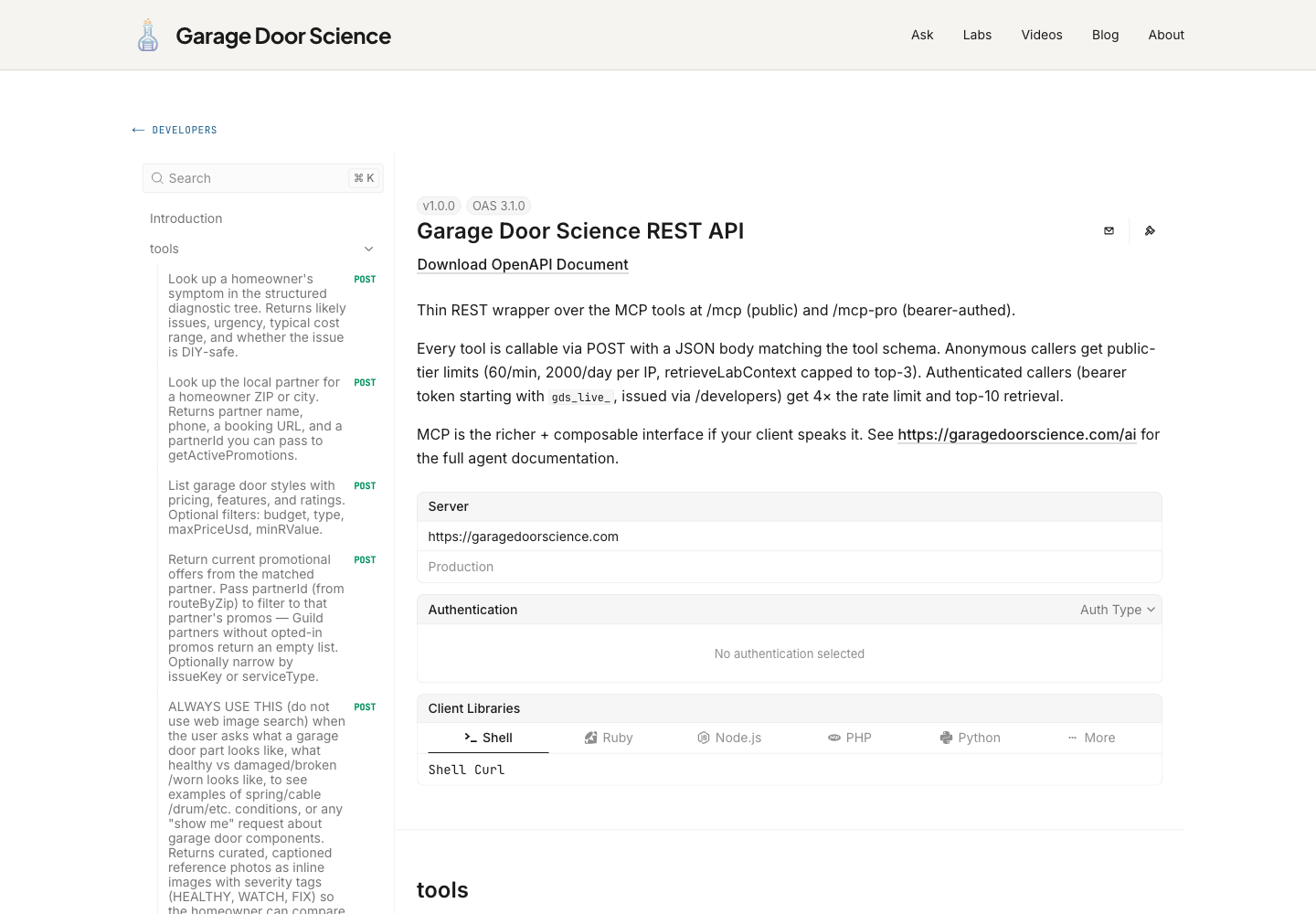
/openapi.json — OpenAPI 3.1 spec, auto-generated from the tool registry at request time. Every tool appears as a POST path with its full input schema. Adding a tool adds a path. No manual documentation to keep in sync with the code. LangChain can load it. Postman can import it.
/developers/api — Scalar renders the OpenAPI spec as interactive documentation. You can try any tool live from your browser, paste in a bearer token, and see a real response against the live API. I didn't build the docs; I built the spec, and Scalar turned it into the docs.
/llms.txt — a plaintext file, at the root of the domain, following an emerging convention for AI-crawlable indexes. It lists every URL on the site grouped by section: tools, labs, articles, videos. Crawling agents and LLM training pipelines can parse it without executing JavaScript. It's about forty lines long and took about twenty minutes to write.
/brain — this one is different from the other six. /brain is not machine-parseable in a structured sense. It's a narrative. It reads like documentation written for a developer, but I wrote it partly for the AI assistants that another developer might be using when they land there. The architecture diagram shows how the pieces fit together. The surface tables explain what each endpoint returns, who it's for, and what auth it requires. The corpus section explains what the RAG index knows and what it doesn't. If an agent is trying to understand what this site can do before it calls anything, /brain is where it starts.
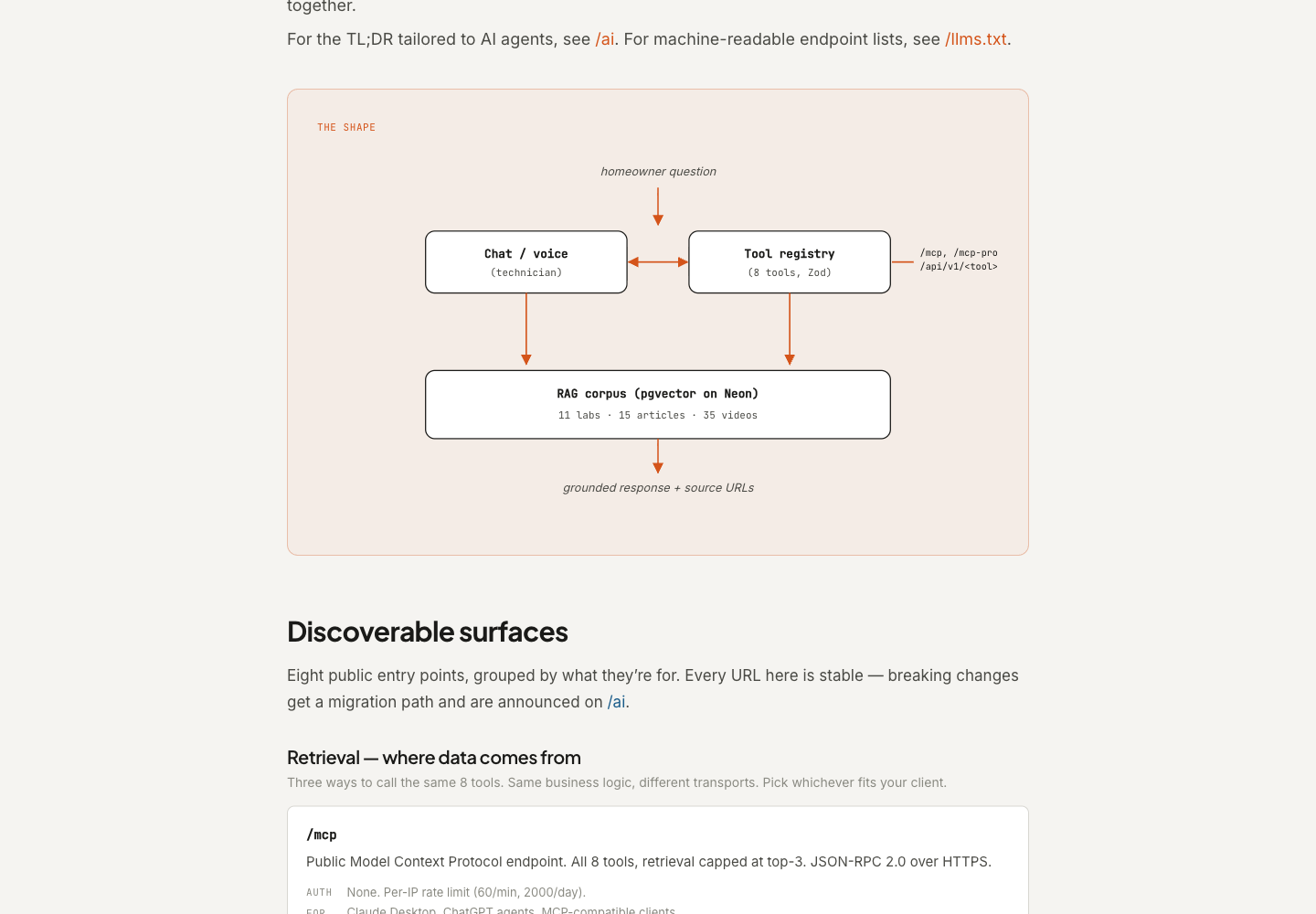
I wrote a page documenting the platform for the other AI to read. That is a new category of work. It doesn't fit neatly into "developer documentation" or "marketing copy." It's somewhere in between — human-readable, but written with the assumption that the first reader might not be human at all.
One thing worth knowing about that tool array: the description field matters more than most engineers expect. When Claude or ChatGPT decides whether to call your tool, it's reading that description — not your README, not your marketing page. If the description is vague or jargon-heavy, the tool gets skipped. If it's specific and honest about what the tool returns, it gets called. The contract is in the description.
What changes when you do this
The honest version: not everything changes immediately.
What changes right away is that your site gains callable surfaces that agent frameworks and AI assistants can discover and use. If someone building an agent wants garage door diagnostic data, they can call /api/v1/diagnose directly instead of scraping your blog. If Claude Desktop has a connector pointed at your MCP endpoint, it can answer homeowner questions with grounded, cited data from your corpus instead of hallucinating general knowledge.
What changes more slowly is discoverability. The /llms.txt convention isn't universal yet. Not every AI assistant knows to look for it. I spent more time deciding what to name the tools than I spent wiring up the endpoints.
The last thing that changes: you find out what your site actually knows, versus what it pretends to know. The /brain page exists partly because I needed to document that honestly — what the system knows (ten labs, thirteen articles, twenty-eight videos, a structured diagnostic tree, a 24-point inspection checklist, partner data for twenty-six service areas) and what it doesn't. When you expose knowledge through a retrieval tool, the results are honest. They tell you where the gaps are.
That Claude instance that called the site last week didn't need my permission. It didn't need me to have a developer relationship with whoever built the application. It found /mcp, discovered the tools, and called routeByZip with a ZIP code. The site was ready. The answer came back.
Build the tools once. The callers will find them.
Seth Shoultes builds things at garagedoorscience.com and writes about them occasionally.