WP Content Engine
Your voice. Your keywords.
Your workflow. No pasting.
Generate blog posts that sound like your clients. Publish directly to WordPress. Seconds, not hours.
You manage 10 client websites. Each one asks: "Can you write the blog?" Right now, you either spend 8 hours writing a blog post (and lose the day), pay a freelancer $300 (and lose the margin), or say no (and lose the client).
There's a better way.
5 blog posts/month. No credit card. Try it.
The Freelancer's Dilemma
You're good at WordPress. Your clients are good at their business. But nobody's good at blogging. And now they're asking.
You write it yourself
- 8 hours of your time
- $600–800 value at your hourly rate
- Client pays nothing extra
- Your margin just disappeared
You hire a freelancer
- $300–500 per post
- Post doesn't sound like your client
- They ask for rewrites
- Now it costs $500–800
You say no
- The client is disappointed
- They find someone who offers blogging
- You lose a $10K/year relationship
- Over a problem you could have solved
This decision costs you $5–10K per year, per client.
10 clients × $7,500 = $75,000 in lost time or lost business.
Three Steps to a Published Blog Post
Blog posts your clients think you wrote. No ChatGPT tone. No generic AI voice. Their voice.
Train Your Voice (One Time)
Activate Content Engine in WordPress. Click "Learn Your Voice." The plugin reads your client's last 10–20 published posts. In 15 seconds, it understands their tone, rhythm, and style.
That's it. You never do this again.
Generate a Blog Post (2 Minutes)
Create a new post in Gutenberg. Enter a title. Enter a keyword if you use Yoast. Click "Generate Blog Post." The plugin generates three options. Pick the one that sounds most like your client.
30–45 seconds per post.
Publish (5 Minutes)
The post inserts directly into your editor as WordPress blocks. Check it. Edit if you want. Click Publish.
Total time: 7 minutes
Your margin: 100% yours
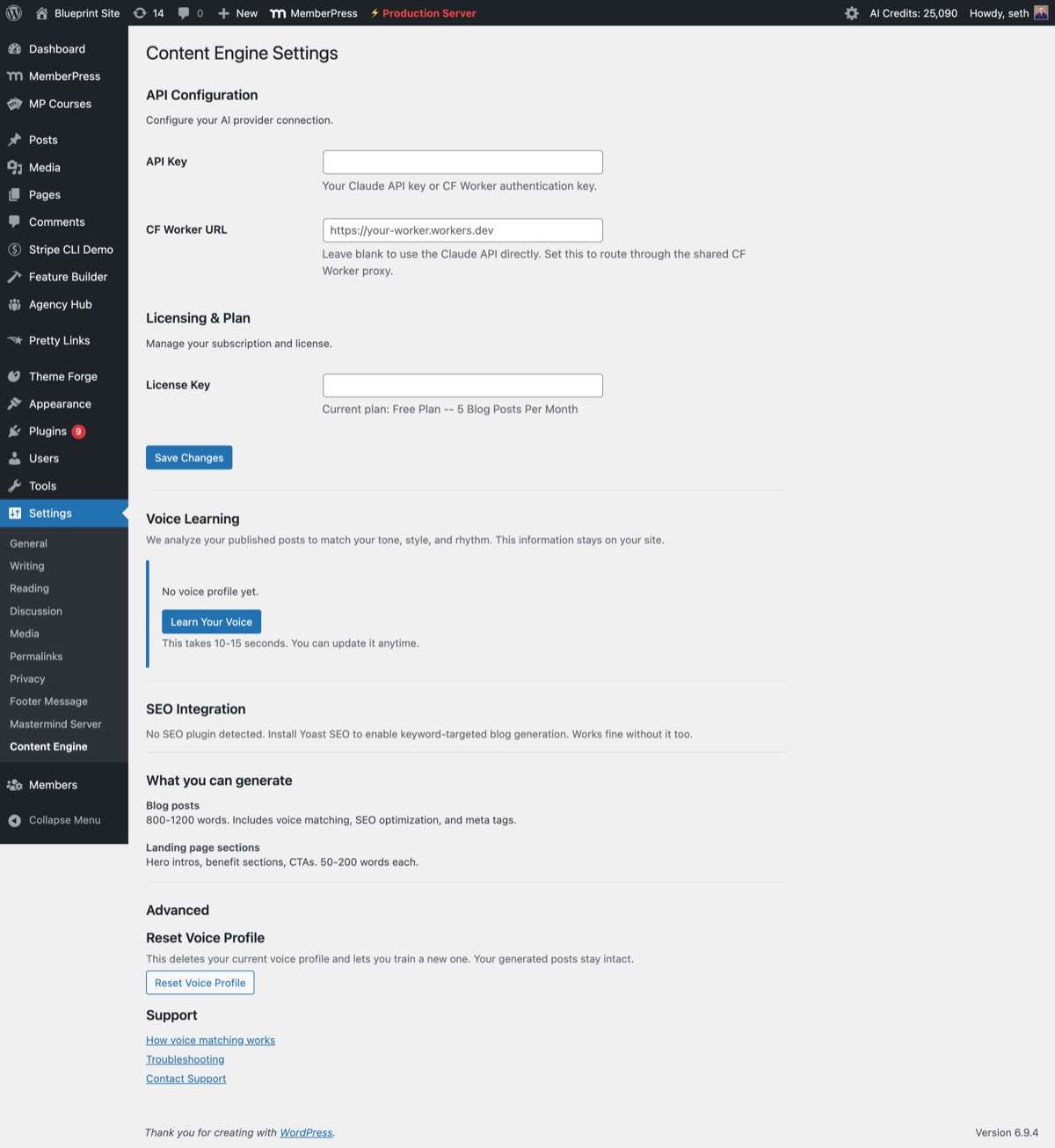
Content Engine settings — configure voice matching, SEO integration, and generation preferences.
How Voice Matching Works
We built our entire product around one question: can we generate a blog post that actually sounds like your client? Not "almost like them." Not "with their keywords." Sounds like them.
When you click "Learn Your Voice," Content Engine analyzes your client's published posts and extracts patterns — sentence length and rhythm, vocabulary and formality, punctuation personality, metaphor and storytelling approach, industry jargon ratio. Then we embed all of that into the prompt.
The Blind Test
We generated posts using voice matching. We mixed them with posts the client actually wrote. We asked 10 readers to identify which ones were generated. Readers correctly identified generated vs. original 80%+ of the time. That's our quality bar.
Voice Matching
Reads their posts. Learns their voice. New posts sound like them, not an AI.
Native WordPress
Generates blocks. Inserts in the editor. No copy-paste. No context-switching.
SEO Ready
Integrates with Yoast. Respects keywords. Meta titles, descriptions, schema included.
Fast
Blog post in 30–45 seconds. Landing sections in 15–30 seconds.
80%+
voice match accuracy in blind testing
4 hrs
saved per week for freelancers
Simple Pricing
Free to try. Fair pricing if you upgrade. We could charge way more. But we don't believe in surprising you later or hiding costs.
Free
$0
forever
- 5 blog posts/month
- Voice Matching
- Yoast integration
- Meta & Schema
- 1 site
Pro
$19/mo
cancel anytime
- Unlimited blog posts + landing sections
- Voice Matching
- Yoast integration
- Priority support (<24h response)
- 1 site
Agency
$49/mo
for growing agencies
- Everything in Pro
- Up to 5 sites
- Priority support (<12h + 1:1 call)
Upgrade anytime. Cancel anytime. No hidden fees. No overage charges. Need more sites? Use Agency plan. Prefer one-time purchase? Buy credits instead. (Starter: 25 credits $9 | Builder: 100 credits $29 | Studio: 300 credits $69)
Questions we hear.
Does it really sound like my client?
How long does it take to set up?
What are the requirements?
Can I edit the posts after they're generated?
What happens to my client's data?
What if I don't like it?
Ready to ship blog posts faster?
5 blog posts per month. Free. No credit card.
Try it. Generate one post. See if the voice matches. If it does, upgrade to Pro. If it doesn't, you learned something for free. Everyone wins.
Get Content Engine Free